Keep it all in one place
Add a grocery by name, set how many you have, and keep your running list up to date.
Goodstock keeps your groceries in view: what you have, where it lives, and when it’s time to use it.
Take a look around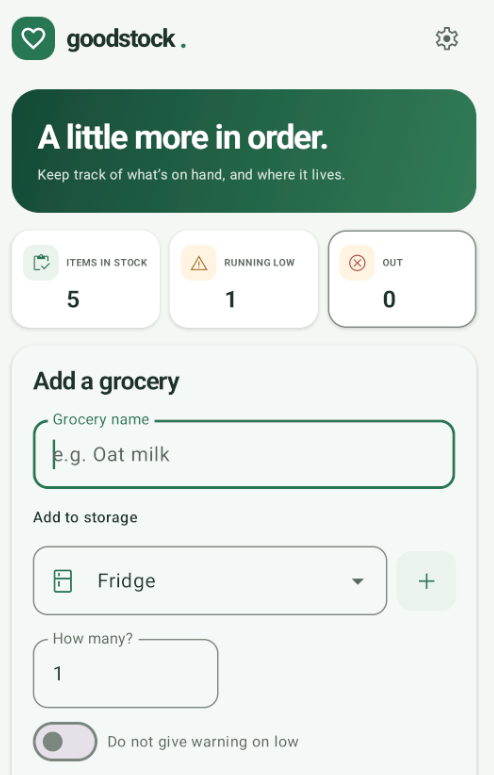
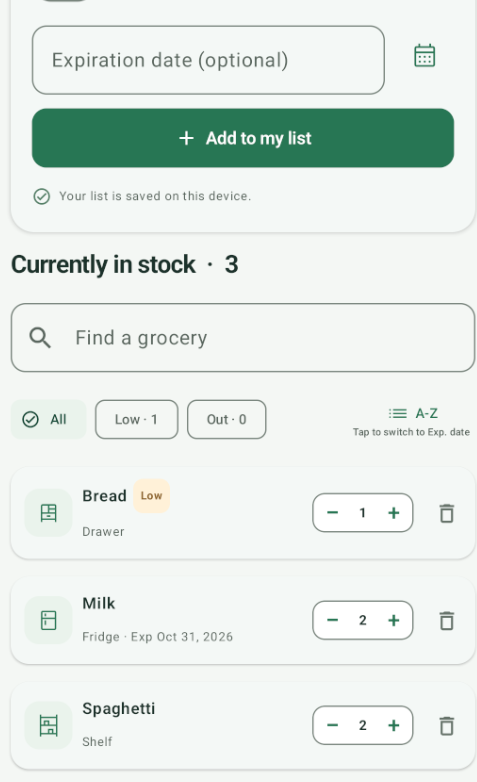
When groceries end up in different drawers, shelves, and freezers, keeping track can take more effort than it should. Goodstock gives your food one simple place on the list.
Made for busy kitchens, full cupboards, and anyone who could use one less thing to keep in their head.
Add a grocery by name, set how many you have, and keep your running list up to date.
Choose a storage spot such as the fridge, freezer, shelf, or drawer, so it’s easier to find later.
Add an optional expiration date and see what’s coming up as you look through your groceries.
Search your list, filter by what’s running low or out, and sort alphabetically or by expiration date.
Adjust what’s in stock as you use it, without having to rebuild your list from scratch.
Running-low counts help you spot what needs attention, and you can turn off the warning for individual items.
See each item’s storage spot and quantity at a glance. Add an expiration date when it’s useful, then find what you’re looking for with search and filters.
Goodstock is a straightforward way to keep track of the food you already have—right down to where you put it.
Back to the top